Making Semi-Private Bookings
Learn how to make semi-private bookings so you can ride with friends or family without other members of the public joining you.
What are Semi-Private Bookings?
Semi-private bookings allow you to book a session with friends or family without other members of the public joining you. These are usually limited to less than 3 participants.
How to Make a Semi-Private Booking
Semi-private bookings will only be available if your centre has enabled slots with this option. When viewed from the Calendar, a slot will say "Semi-Private" or "Private or Semi-Private" in the title if it's available as a semi-private slot.
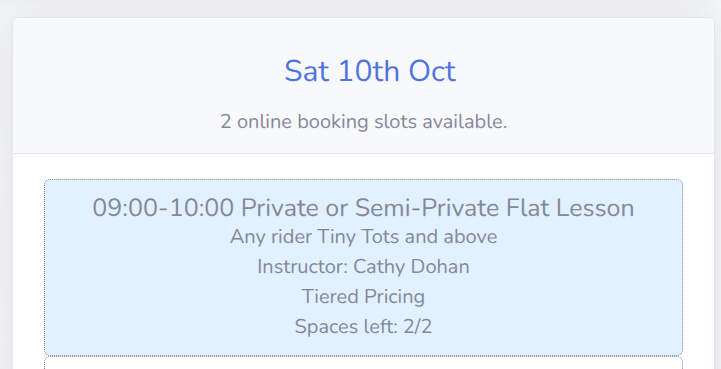
If you select a semi-private slot which is suitable for any of your rider profiles, you will be prompted to select which rider you would like to book into the session, along with a range of options for that booking.
If the slot is a "tiered" semi-private slot, then one of the options will ask you to select the number of participants for the session. Instead of each rider paying the same amount, the lead booker will have to select and pay for the full group. The lead booker will have to select how many adults and children will be joining them in the slot. It is the lead bookers responsibility to recruit and manage the group and potentially split the payment
How do I add additional participants to a Semi-Private Booking?
Participants from the same account can be added to the basket and checked out together. To add additional profile(s) to your basket simply return to the calendar, select the slot, and then select which rider profile to book in.
Once the lead booker has completed the check out process, they will be emailed a unique link. They can share this link to participants from separate accounts so they can join the semi-private booking.
How can I cancel or modify a Semi-Private Booking?
Participants can be cancel their booking from their dashboard, regardless of if they are from the same or separate accounts.
To change the tier of a semi-private booking please cancel all bookings for the slot and then re-book it with the correct tier, or speak to an administrator at your centre.